


GitHub MCP connector
OAuth 2.1 Developer ToolsCollaborationConnect to GitHub MCP. Manage repositories, issues, pull requests, branches, and files directly from your AI workflows.
GitHub MCP connector
-
Install the SDK
Section titled “Install the SDK”Terminal window npm install @scalekit-sdk/nodeTerminal window pip install scalekit -
Set your credentials
Section titled “Set your credentials”Add your Scalekit credentials to your
.envfile. Find values in app.scalekit.com > Developers > API Credentials..env SCALEKIT_ENVIRONMENT_URL=<your-environment-url>SCALEKIT_CLIENT_ID=<your-client-id>SCALEKIT_CLIENT_SECRET=<your-client-secret> -
Set up the connector
Section titled “Set up the connector”Register your GitHub MCP credentials with Scalekit so it handles the token lifecycle. You do this once per environment.
Dashboard setup steps
Register your GitHub credentials with Scalekit so it handles the token lifecycle. You do this once per environment.
-
Set up auth redirects
-
In Scalekit dashboard, go to AgentKit > Connections > Create Connection. Find GitHub MCP and click Create.
-
Click Use your own credentials and copy the redirect URI. It looks like
https://<SCALEKIT_ENVIRONMENT_URL>/sso/v1/oauth/<CONNECTION_ID>/callback.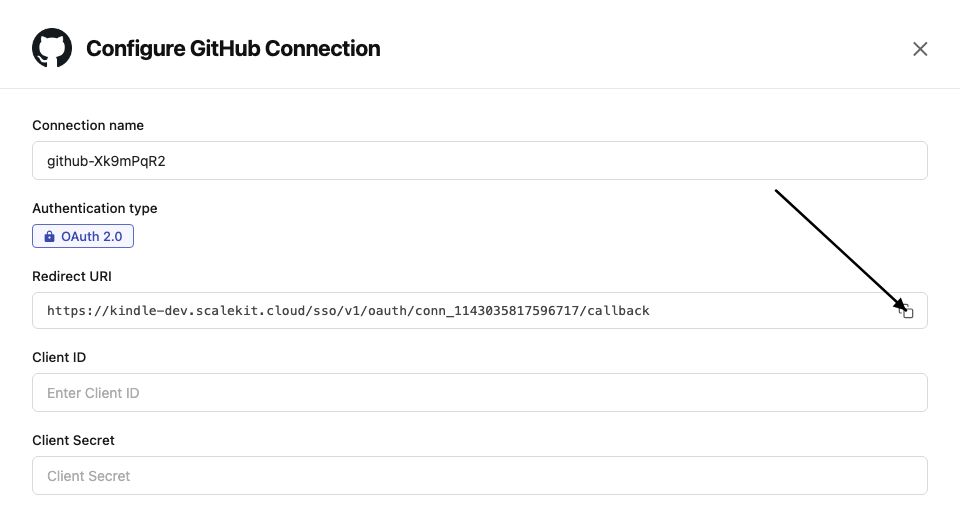
-
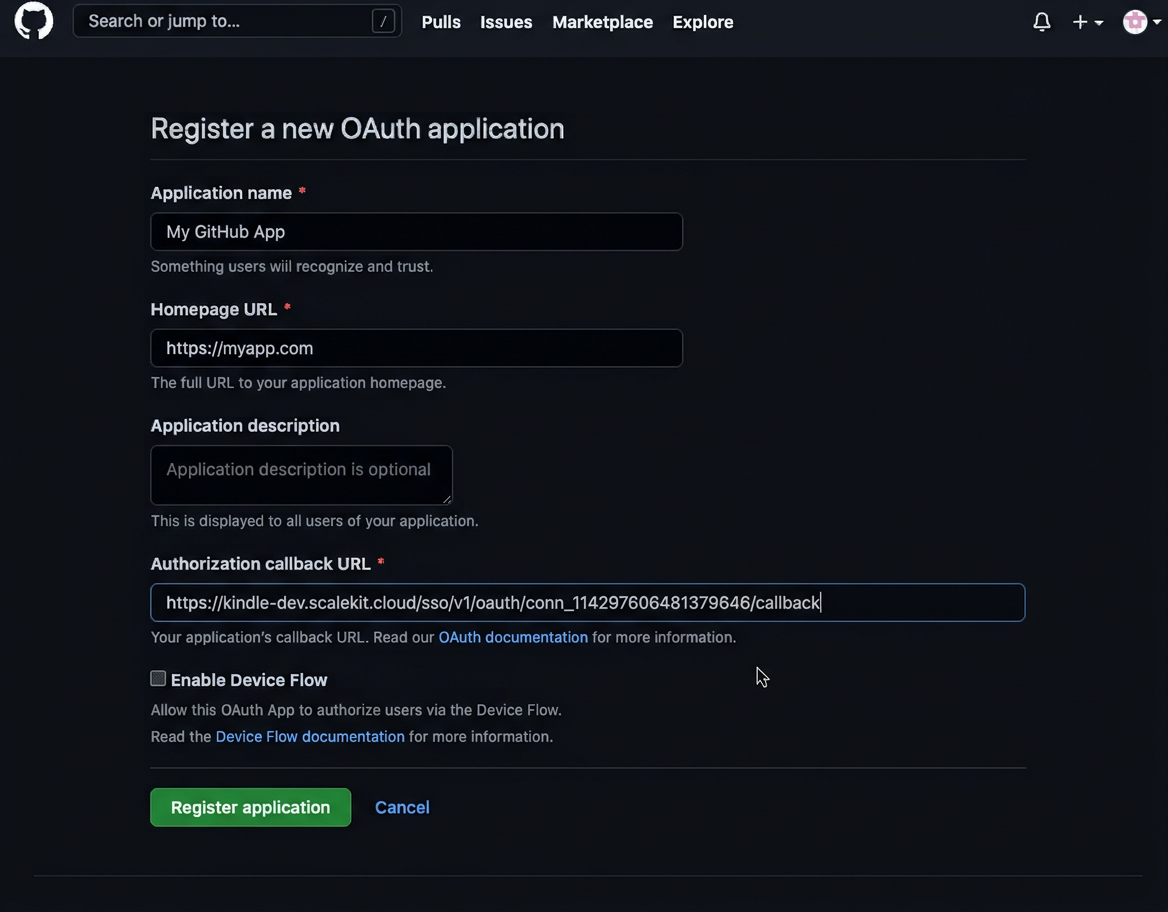
Go to GitHub Developer Settings and open your OAuth app.
-
Under General, paste the copied URI into the Authorization callback URL field and click Save application.
-
-
Get client credentials
In GitHub Developer Settings, open your OAuth app:
- Client ID — listed on the app’s main settings page
- Client Secret — click Generate a new client secret if you don’t have one
-
Add credentials in Scalekit
-
In Scalekit dashboard, go to AgentKit > Connections and open the connection you created.
-
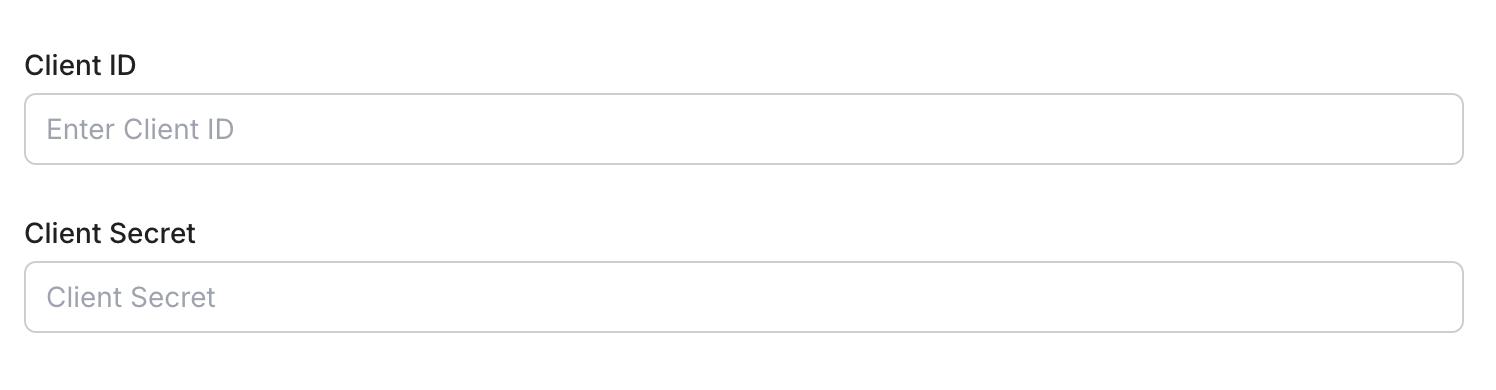
Enter your credentials:
- Client ID (from your GitHub OAuth app)
- Client Secret (from your GitHub OAuth app)
-
Click Save.
-
-
-
Authorize and make your first call
Section titled “Authorize and make your first call”quickstart.ts import { ScalekitClient } from '@scalekit-sdk/node'import 'dotenv/config'const scalekit = new ScalekitClient(process.env.SCALEKIT_ENV_URL,process.env.SCALEKIT_CLIENT_ID,process.env.SCALEKIT_CLIENT_SECRET,)const actions = scalekit.actionsconst connector = 'githubmcp'const identifier = 'user_123'// Generate an authorization link for the userconst { link } = await actions.getAuthorizationLink({ connectionName: connector, identifier })console.log('Authorize GitHub MCP:', link)process.stdout.write('Press Enter after authorizing...')await new Promise(r => process.stdin.once('data', r))// Make your first callconst result = await actions.executeTool({connector,identifier,toolName: 'githubmcp_get_me',toolInput: {},})console.log(result)quickstart.py import osfrom scalekit.client import ScalekitClientfrom dotenv import load_dotenvload_dotenv()scalekit_client = ScalekitClient(env_url=os.getenv("SCALEKIT_ENV_URL"),client_id=os.getenv("SCALEKIT_CLIENT_ID"),client_secret=os.getenv("SCALEKIT_CLIENT_SECRET"),)actions = scalekit_client.actionsconnection_name = "githubmcp"identifier = "user_123"# Generate an authorization link for the userlink_response = actions.get_authorization_link(connection_name=connection_name,identifier=identifier,)print("Authorize GitHub MCP:", link_response.link)input("Press Enter after authorizing...")# Make your first callresult = actions.execute_tool(tool_input={},tool_name="githubmcp_get_me",connection_name=connection_name,identifier=identifier,)print(result)
What you can do
Section titled “What you can do”Connect this agent connector to let your agent:
- Update pull request branch, pull request — Update a pull request branch with the latest changes from the base branch
- Write sub issue, pull request review, issue — Add, remove, or reorder a sub-issue under a parent issue in a GitHub repository
- Search users, repositories, pull requests — Search for GitHub users by username, name, or other profile information
- Run secret scanning — Scan files or content for exposed secrets such as API keys, passwords, and tokens
- Review request copilot, add comment to pending — Request a GitHub Copilot automated code review for a pull request
- Files push — Push multiple files to a GitHub repository in a single commit
Tool list
Section titled “Tool list”Use the exact tool names from the Tool list below when you call execute_tool. If you’re not sure which name to use, list the tools available for the current user first.
githubmcp_add_comment_to_pending_review
#
Add a review comment to the requester's latest pending pull request review. 10 params
Add a review comment to the requester's latest pending pull request review.
body string required The text content of the comment, review, or description. owner string required The GitHub repository owner (username or organization name). path string required The file path within the repository. pullNumber number required The pull request number. repo string required The GitHub repository name. subjectType string required The subject type for the review comment: line or file. line number optional The line number in the file the comment applies to. side string optional The side of the diff the comment applies to: LEFT or RIGHT. startLine number optional The first line of a multi-line comment range. startSide string optional The side of the diff for the start of a multi-line comment: LEFT or RIGHT. githubmcp_add_issue_comment
#
Add a comment to a specific issue in a GitHub repository. 4 params
Add a comment to a specific issue in a GitHub repository.
body string required The text content of the comment, review, or description. issue_number number required The issue number. owner string required The GitHub repository owner (username or organization name). repo string required The GitHub repository name. githubmcp_add_reply_to_pull_request_comment
#
Add a reply to an existing pull request review comment. 5 params
Add a reply to an existing pull request review comment.
body string required The text content of the comment, review, or description. commentId number required The numeric ID of the comment to reply to. owner string required The GitHub repository owner (username or organization name). pullNumber number required The pull request number. repo string required The GitHub repository name. githubmcp_create_branch
#
Create a new branch in a GitHub repository. 4 params
Create a new branch in a GitHub repository.
branch string required The branch name. owner string required The GitHub repository owner (username or organization name). repo string required The GitHub repository name. from_branch string optional The source branch to create the new branch from. Defaults to the default branch if omitted. githubmcp_create_or_update_file
#
Create or update a single file in a GitHub repository. Provide the file SHA when updating an existing file. 7 params
Create or update a single file in a GitHub repository. Provide the file SHA when updating an existing file.
branch string required The branch name. content string required The base64-encoded file content. message string required The commit message. owner string required The GitHub repository owner (username or organization name). path string required The file path within the repository. repo string required The GitHub repository name. sha string optional The blob SHA of the file being replaced. Required when updating an existing file. githubmcp_create_pull_request
#
Create a new pull request in a GitHub repository. 8 params
Create a new pull request in a GitHub repository.
base string required The name of the branch you want the changes merged into. head string required The name of the branch where changes are implemented. owner string required The GitHub repository owner (username or organization name). repo string required The GitHub repository name. title string required The title of the issue or pull request. body string optional The text content of the comment, review, or description. draft boolean optional Whether to create the pull request as a draft. maintainer_can_modify boolean optional Whether maintainers can modify the pull request. githubmcp_create_repository
#
Create a new GitHub repository in your account or a specified organization. 5 params
Create a new GitHub repository in your account or a specified organization.
name string required The repository name. autoInit boolean optional Whether to initialize the repository with a README. description string optional Repository description organization string optional The GitHub organization to create the repository in. Defaults to your personal account. private boolean optional Whether to make the repository private. githubmcp_delete_file
#
Delete a file from a GitHub repository. 5 params
Delete a file from a GitHub repository.
branch string required The branch name. message string required The commit message. owner string required The GitHub repository owner (username or organization name). path string required The file path within the repository. repo string required The GitHub repository name. githubmcp_fork_repository
#
Fork a GitHub repository to your account or a specified organization. 3 params
Fork a GitHub repository to your account or a specified organization.
owner string required The GitHub repository owner (username or organization name). repo string required The GitHub repository name. organization string optional The GitHub organization to create the repository in. Defaults to your personal account. githubmcp_get_commit
#
Get details for a specific commit from a GitHub repository. 6 params
Get details for a specific commit from a GitHub repository.
owner string required The GitHub repository owner (username or organization name). repo string required The GitHub repository name. sha string required The blob SHA of the file being replaced. Required when updating an existing file. include_diff boolean optional Whether to include the diff in the commit details. page number optional The page number for pagination. perPage number optional The number of results per page (max 100). githubmcp_get_file_contents
#
Get the contents of a file or directory from a GitHub repository. 5 params
Get the contents of a file or directory from a GitHub repository.
owner string required The GitHub repository owner (username or organization name). repo string required The GitHub repository name. path string optional The file path within the repository. ref string optional The git ref (branch, tag, or commit SHA) to fetch the file from. sha string optional The blob SHA of the file being replaced. Required when updating an existing file. githubmcp_get_label
#
Get a specific label from a GitHub repository. 3 params
Get a specific label from a GitHub repository.
name string required The repository name. owner string required The GitHub repository owner (username or organization name). repo string required The GitHub repository name. githubmcp_get_latest_release
#
Get the latest release in a GitHub repository. 2 params
Get the latest release in a GitHub repository.
owner string required The GitHub repository owner (username or organization name). repo string required The GitHub repository name. githubmcp_get_me
#
Get details of the authenticated GitHub user. 0 params
Get details of the authenticated GitHub user.
githubmcp_get_release_by_tag
#
Get a specific release by its tag name in a GitHub repository. 3 params
Get a specific release by its tag name in a GitHub repository.
owner string required The GitHub repository owner (username or organization name). repo string required The GitHub repository name. tag string required The tag name of the release. githubmcp_get_tag
#
Get details about a specific git tag in a GitHub repository. 3 params
Get details about a specific git tag in a GitHub repository.
owner string required The GitHub repository owner (username or organization name). repo string required The GitHub repository name. tag string required The tag name of the release. githubmcp_get_team_members
#
Get the member usernames of a specific team in a GitHub organization. 2 params
Get the member usernames of a specific team in a GitHub organization.
org string required The GitHub organization slug. team_slug string required The team slug within the organization. githubmcp_get_teams
#
Get details of the teams the authenticated user is a member of. 1 param
Get details of the teams the authenticated user is a member of.
user string optional The GitHub username to filter teams by. githubmcp_issue_read
#
Get information about a specific issue or its comments in a GitHub repository. 6 params
Get information about a specific issue or its comments in a GitHub repository.
issue_number number required The issue number. method string required The operation to perform. Check the tool description for available methods. owner string required The GitHub repository owner (username or organization name). repo string required The GitHub repository name. page number optional The page number for pagination. perPage number optional The number of results per page (max 100). githubmcp_issue_write
#
Create a new issue or update an existing issue in a GitHub repository. 13 params
Create a new issue or update an existing issue in a GitHub repository.
method string required The operation to perform. Check the tool description for available methods. owner string required The GitHub repository owner (username or organization name). repo string required The GitHub repository name. assignees array optional List of GitHub usernames to assign to the issue. body string optional The text content of the comment, review, or description. duplicate_of number optional The issue number this issue is a duplicate of. issue_number number optional The issue number. labels array optional List of label names to apply to the issue. milestone number optional The milestone number to associate with the issue. state string optional Filter by state: open, closed, or all. state_reason string optional The reason for closing: completed, not_planned, or reopened. title string optional The title of the issue or pull request. type string optional The issue type name to assign. githubmcp_list_branches
#
List branches in a GitHub repository. 4 params
List branches in a GitHub repository.
owner string required The GitHub repository owner (username or organization name). repo string required The GitHub repository name. page number optional The page number for pagination. perPage number optional The number of results per page (max 100). githubmcp_list_commits
#
List commits on a branch in a GitHub repository. 9 params
List commits on a branch in a GitHub repository.
owner string required The GitHub repository owner (username or organization name). repo string required The GitHub repository name. author string optional Filter commits by author username or email. page number optional The page number for pagination. path string optional The file path within the repository. perPage number optional The number of results per page (max 100). sha string optional The blob SHA of the file being replaced. Required when updating an existing file. since string optional Filter results created after this ISO 8601 timestamp. until string optional Filter results created before this ISO 8601 timestamp. githubmcp_list_issue_types
#
List supported issue types for a GitHub organization. 1 param
List supported issue types for a GitHub organization.
owner string required The GitHub repository owner (username or organization name). githubmcp_list_issues
#
List issues in a GitHub repository with optional filters for state, labels, and date range. 9 params
List issues in a GitHub repository with optional filters for state, labels, and date range.
owner string required The GitHub repository owner (username or organization name). repo string required The GitHub repository name. after string optional Pagination cursor from the previous response to fetch the next page. direction string optional The sort direction: asc or desc. labels array optional List of label names to apply to the issue. orderBy string optional The field to order results by. perPage number optional The number of results per page (max 100). since string optional Filter results created after this ISO 8601 timestamp. state string optional Filter by state: open, closed, or all. githubmcp_list_pull_requests
#
List pull requests in a GitHub repository with optional filters. 9 params
List pull requests in a GitHub repository with optional filters.
owner string required The GitHub repository owner (username or organization name). repo string required The GitHub repository name. base string optional The name of the branch you want the changes merged into. direction string optional The sort direction: asc or desc. head string optional The name of the branch where changes are implemented. page number optional The page number for pagination. perPage number optional The number of results per page (max 100). sort string optional The field to sort results by. state string optional Filter by state: open, closed, or all. githubmcp_list_releases
#
List releases in a GitHub repository. 4 params
List releases in a GitHub repository.
owner string required The GitHub repository owner (username or organization name). repo string required The GitHub repository name. page number optional The page number for pagination. perPage number optional The number of results per page (max 100). githubmcp_list_repository_collaborators
#
List collaborators of a GitHub repository. 5 params
List collaborators of a GitHub repository.
owner string required The GitHub repository owner (username or organization name). repo string required The GitHub repository name. affiliation string optional Filter collaborators by affiliation: direct, outside, or all. page number optional The page number for pagination. perPage number optional The number of results per page (max 100). githubmcp_list_tags
#
List git tags in a GitHub repository. 4 params
List git tags in a GitHub repository.
owner string required The GitHub repository owner (username or organization name). repo string required The GitHub repository name. page number optional The page number for pagination. perPage number optional The number of results per page (max 100). githubmcp_merge_pull_request
#
Merge a pull request in a GitHub repository. 6 params
Merge a pull request in a GitHub repository.
owner string required The GitHub repository owner (username or organization name). pullNumber number required The pull request number. repo string required The GitHub repository name. commit_message string optional An optional longer message to accompany the commit title. commit_title string optional The title for the merge commit. merge_method string optional The merge method: merge, squash, or rebase. githubmcp_pull_request_read
#
Get information about a specific pull request or its reviews, comments, or files. 6 params
Get information about a specific pull request or its reviews, comments, or files.
method string required The operation to perform. Check the tool description for available methods. owner string required The GitHub repository owner (username or organization name). pullNumber number required The pull request number. repo string required The GitHub repository name. page number optional The page number for pagination. perPage number optional The number of results per page (max 100). githubmcp_pull_request_review_write
#
Create, submit, or delete a pull request review. Supported methods: create, submit, delete, resolve_thread, unresolve_thread. 8 params
Create, submit, or delete a pull request review. Supported methods: create, submit, delete, resolve_thread, unresolve_thread.
method string required The operation to perform. Check the tool description for available methods. owner string required The GitHub repository owner (username or organization name). pullNumber number required The pull request number. repo string required The GitHub repository name. body string optional The text content of the comment, review, or description. commitID string optional The SHA of the commit to associate with the review. event string optional The review action: APPROVE, REQUEST_CHANGES, or COMMENT. threadId string optional The ID of the review thread to resolve or unresolve. githubmcp_push_files
#
Push multiple files to a GitHub repository in a single commit. 5 params
Push multiple files to a GitHub repository in a single commit.
branch string required The branch name. files array required List of files to push, each with a path and content. message string required The commit message. owner string required The GitHub repository owner (username or organization name). repo string required The GitHub repository name. githubmcp_request_copilot_review
#
Request a GitHub Copilot automated code review for a pull request. 3 params
Request a GitHub Copilot automated code review for a pull request.
owner string required The GitHub repository owner (username or organization name). pullNumber number required The pull request number. repo string required The GitHub repository name. githubmcp_run_secret_scanning
#
Scan files or content for exposed secrets such as API keys, passwords, and tokens. 3 params
Scan files or content for exposed secrets such as API keys, passwords, and tokens.
files string required List of files to push, each with a path and content. owner string required The GitHub repository owner (username or organization name). repo string required The GitHub repository name. githubmcp_search_code
#
Search for code across GitHub repositories using GitHub code search syntax. 5 params
Search for code across GitHub repositories using GitHub code search syntax.
query string required The search query string. order string optional The sort order: asc or desc. page number optional The page number for pagination. perPage number optional The number of results per page (max 100). sort string optional The field to sort results by. githubmcp_search_issues
#
Search for issues across GitHub repositories using GitHub issues search syntax. 7 params
Search for issues across GitHub repositories using GitHub issues search syntax.
query string required The search query string. order string optional The sort order: asc or desc. owner string optional The GitHub repository owner (username or organization name). page number optional The page number for pagination. perPage number optional The number of results per page (max 100). repo string optional The GitHub repository name. sort string optional The field to sort results by. githubmcp_search_pull_requests
#
Search for pull requests across GitHub repositories using GitHub search syntax. 7 params
Search for pull requests across GitHub repositories using GitHub search syntax.
query string required The search query string. order string optional The sort order: asc or desc. owner string optional The GitHub repository owner (username or organization name). page number optional The page number for pagination. perPage number optional The number of results per page (max 100). repo string optional The GitHub repository name. sort string optional The field to sort results by. githubmcp_search_repositories
#
Search for GitHub repositories by name, description, topics, or other metadata. 6 params
Search for GitHub repositories by name, description, topics, or other metadata.
query string required The search query string. minimal_output boolean optional Whether to return minimal output to reduce response size. order string optional The sort order: asc or desc. page number optional The page number for pagination. perPage number optional The number of results per page (max 100). sort string optional The field to sort results by. githubmcp_search_users
#
Search for GitHub users by username, name, or other profile information. 5 params
Search for GitHub users by username, name, or other profile information.
query string required The search query string. order string optional The sort order: asc or desc. page number optional The page number for pagination. perPage number optional The number of results per page (max 100). sort string optional The field to sort results by. githubmcp_sub_issue_write
#
Add, remove, or reorder a sub-issue under a parent issue in a GitHub repository. 8 params
Add, remove, or reorder a sub-issue under a parent issue in a GitHub repository.
issue_number number required The issue number. method string required The operation to perform. Check the tool description for available methods. owner string required The GitHub repository owner (username or organization name). repo string required The GitHub repository name. sub_issue_id number required The issue number of the sub-issue. after_id number optional Insert the sub-issue after this sub-issue ID. before_id number optional Insert the sub-issue before this sub-issue ID. replace_parent boolean optional Whether to replace the existing parent issue. githubmcp_update_pull_request
#
Update the title, body, state, or other fields of an existing pull request. 10 params
Update the title, body, state, or other fields of an existing pull request.
owner string required The GitHub repository owner (username or organization name). pullNumber number required The pull request number. repo string required The GitHub repository name. base string optional The name of the branch you want the changes merged into. body string optional The text content of the comment, review, or description. draft boolean optional Whether to create the pull request as a draft. maintainer_can_modify boolean optional Whether maintainers can modify the pull request. reviewers array optional List of GitHub usernames to request reviews from. state string optional Filter by state: open, closed, or all. title string optional The title of the issue or pull request. githubmcp_update_pull_request_branch
#
Update a pull request branch with the latest changes from the base branch. 4 params
Update a pull request branch with the latest changes from the base branch.
owner string required The GitHub repository owner (username or organization name). pullNumber number required The pull request number. repo string required The GitHub repository name. expectedHeadSha string optional The expected SHA of the pull request HEAD ref for optimistic locking.